

Problem Statement
As per requirement, we set up the MK15/G12 ground system with an A8 Mini gimbal camera on a Mini Pix flight controller.
Hardware integration is complete.
The remaining gap was software: Mini Pix needed a set of Ardu pilot parameters that were not present in the standard firmware build. Mini Pix needs custom Ardu pilot firmware.

Challenge
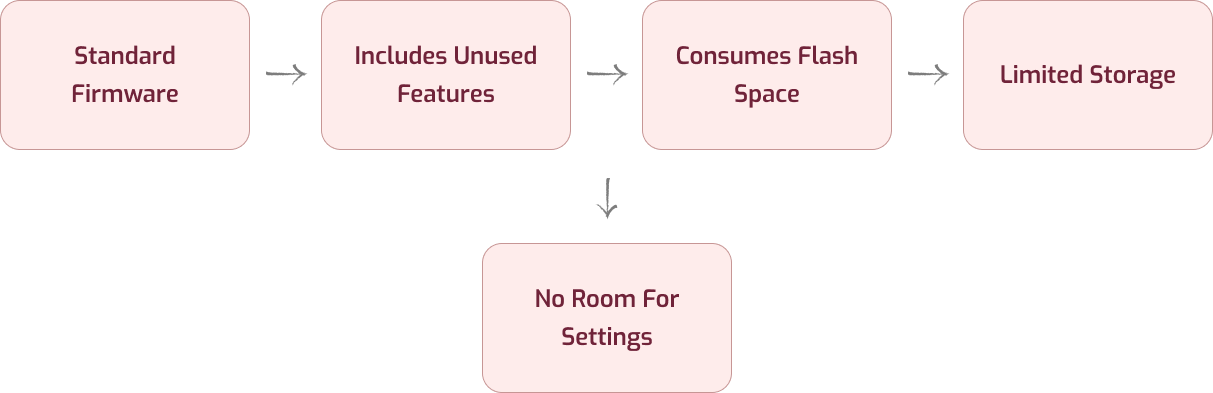
Standard Ardu pilot firmware includes a lot of features we don’t use. Flashing that onto Mini Pix eats up flash space we don’t have — Mini Pix has limited storage, so a full-featured build simply won’t fit alongside the settings we actually need.
Engineering Approach
Rather than trying to force the stock firmware to work, we looked at what was actually driving the space constraint. The question was simple: does the firmware need everything it currently includes, or only a subset relevant to this build?
The answer was clear. Most of the compiled in modules were never going to be used in this deployment. The fix was not new hardware or a different board — it was a
firmware trimmed to exactly what the application required.

Solution
Use Ardu pilot’s Custom Firmware Builder to compile a build with only the features our setup needs — drop the unused modules, keep what MK15/G12 + A8 Mini + Mini Pix requires. This keeps the firmware small enough to flash and still gives us the custom parameters (mount/gimbal, camera type, etc.) that the stock build lacks.
Steps:
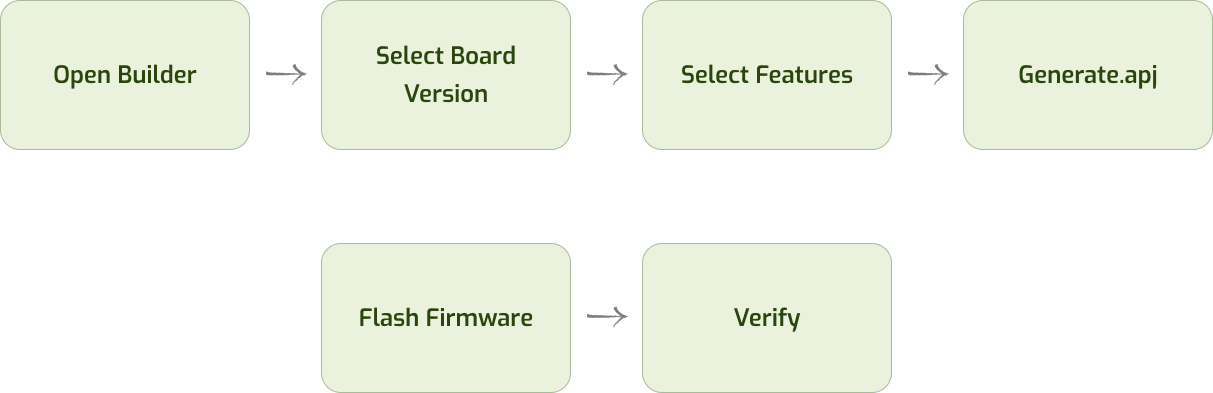
- Open Ardu pilot Custom Firmware Builder
- Select Copter + firmware version
- Select Mini Pix board
- Select only required features (skip unused modules to save space)
- Generate the custom .apj firmware file
- Flash via Mission Planner / QGC
- Verify parameters now show up
Engineering Learning
When flash space is limited, the fix isn’t always different hardware — it’s a firmware build scoped to exactly what the application needs.